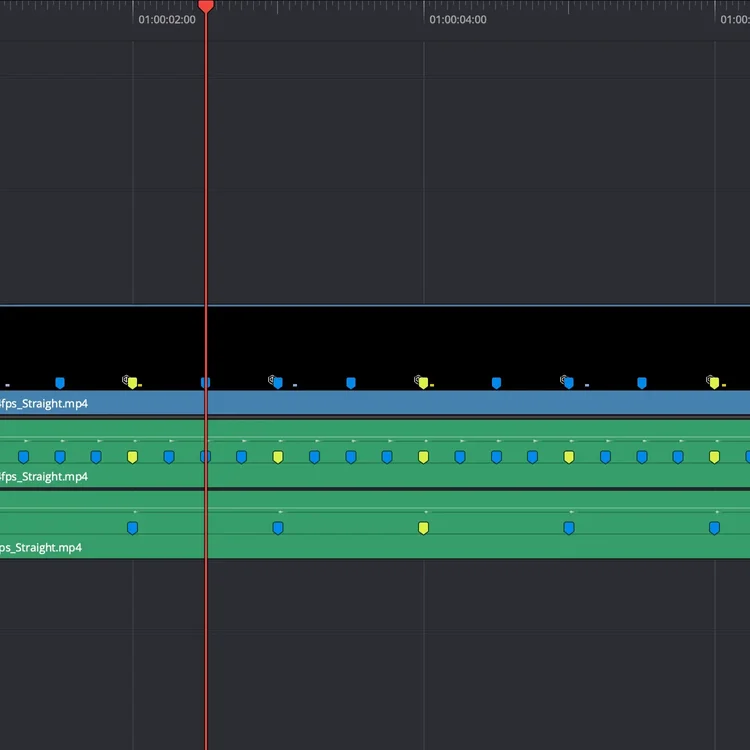
See how cuts snap into place
Use it to cut to or against. First pass, everything is structured. Second pass, break the structure to add identity.
Free Timing Guides
£0.00
Evenly spaced cuts. Instantly.
3 timing layers. Different tempos. Ready to use.
Cuts line up immediately.
Download. Drop in. Start cutting.
4/4 - 60 / 120 / 240 BPM - 24 / 25 / 30 / 60 fps
Drop the timing guides onto your timeline and start cutting.
No nudging. No guessing. Just cut to or against the guide.
How it works
Each guide is a frame-accurate timing layer generated by the ClearCue engine.
Place it in your timeline and cut to the pulses.
Works in any editor that supports video layers.
Whats included
Straight timing guides (4/4)
BPM options: 60 / 120 / 240
Frame rates: 24 / 25 / 30 / 60 fps
Quick start guide
What its for
Music-driven edits
Dialogue pacing
Clean rhythmic cutting
Base timing structure
Compatibility
In DaVinci Resolve, markers are embedded directly.
In other editors, align cuts to the guide’s pulses.
Works with:
DaVinci Resolve (recommended)
Premiere Pro
Final Cut Pro
CapCut
About ClearCue Markers:
These are frame-accurate timing structures you can use immediately.
Built for speed - no manual marker placement.
No setup. No adjustment.
More control?
Build your own timing patterns with the Precision TimeVisualiser
What do I receive when I purchase a timing kit?
You receive a set of frame-accurate timing guides as video files, along with multiple BPM and frame-rate versions, a quick-start guide, and an example edit.
How do I use the timing guides?
Place the guide on a track in your timeline and follow the visual pulses to position cuts, transitions, or motion.
Which editing software is supported?
Designed for Resolve (Recommended)
The guides work in any video editor that supports video layers, including DaVinci Resolve, Premiere Pro, Final Cut Pro, and CapCut.
Do I need the ClearCue Engine to use these kits?
No. The kits are ready-to-use timing structures. The engine is only needed if you want to generate your own custom timing systems.
What's the difference between kits and the engine?
Kits are pre-generated timing structures.
The engine allows you to create your own using tempo, meter, and pattern.
How does this work in DaVinci Resolve?
Markers are embedded directly in the timing guides, so you can edit using markers and visual pulses together.
How does this work in other editors?
Markers can be added by aligning to the guide’s audio transients, or you can edit directly using the visual pulses.
Can I use these with any type of footage?
Yes. The guides sit above your footage and do not affect your media.
Are these presets or templates?
No. Each kit is a timing structure. You are using it as a guide, not applying an effect.
Can I combine multiple timing guides?
Yes. Guides can be layered or switched within a timeline to create more complex pacing structures.
Do I need music to use this?
No. Timing can be designed before adding music, or used to refine pacing after.
Are updates included?
Each kit is a fixed set of timing structures. New timing systems are released as separate elements.